Rota, payroll and leave. One place.
Staff rota, payroll timesheets and leave in one system, for one site or many.
Platforms: Web
Starter £119 a year (one business, up to 16 staff) or Pro £159 a year (unlimited businesses and staff). Billed annually and renews automatically every 12 months until you cancel. Cancel free at any time and your plan runs to the end of the paid year.
Why we built StaffRota
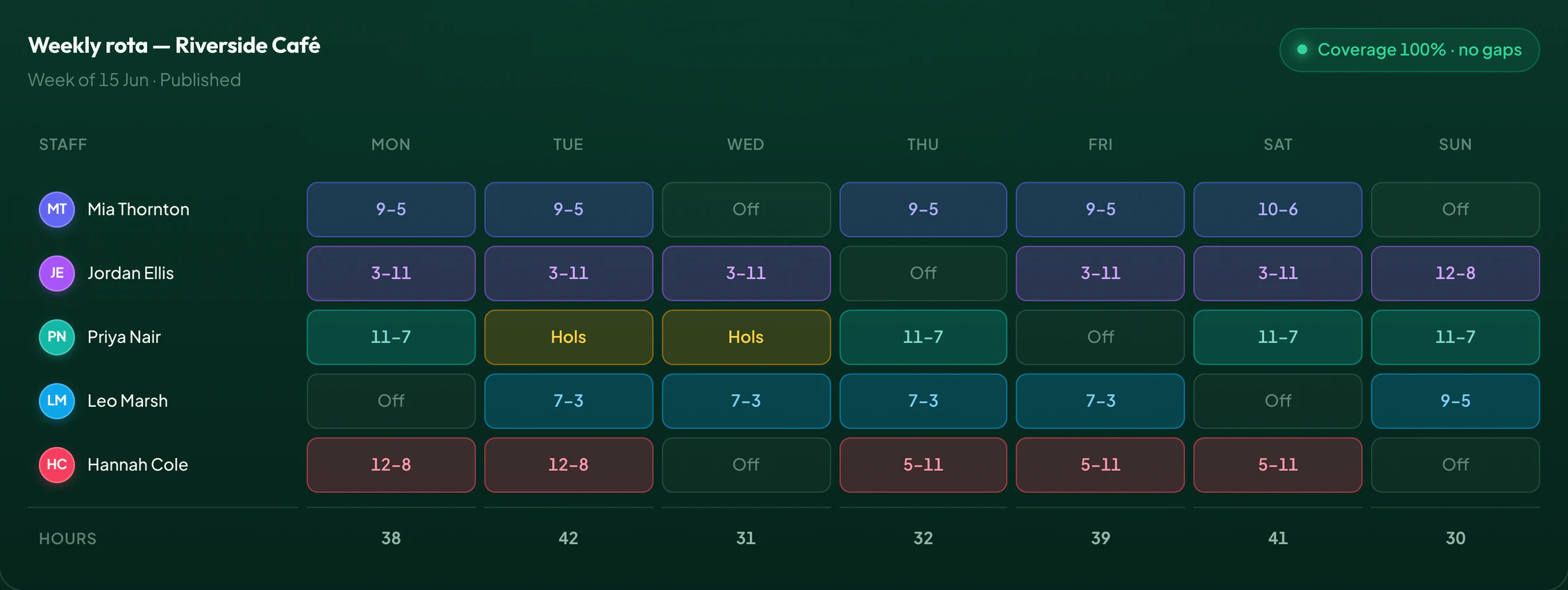
Sunday night used to be rota night.
Next week’s rota meant a spreadsheet, a group chat and a phone call for every swap. Then someone had to add the hours up all over again for payroll.
StaffRota turns the rota into the timesheet. Shifts, holidays and sick days flow straight into pay. Staff sort out cover and swaps from their own phones, and nothing changes until a manager says yes.
One system, from the first shift of the week to the accountant’s inbox.

More real screens, from real shifts.
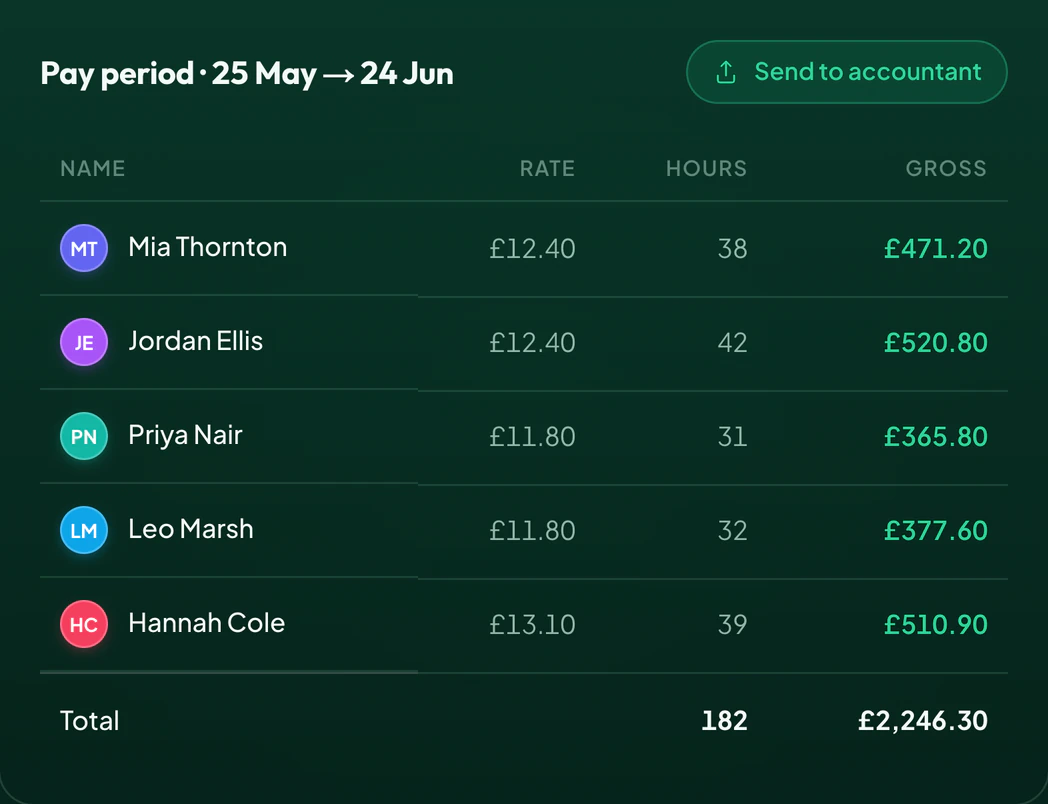
Pay-ready timesheets
Pay-period timesheet with rate, hours and gross pay per person, ready to send to the accountant
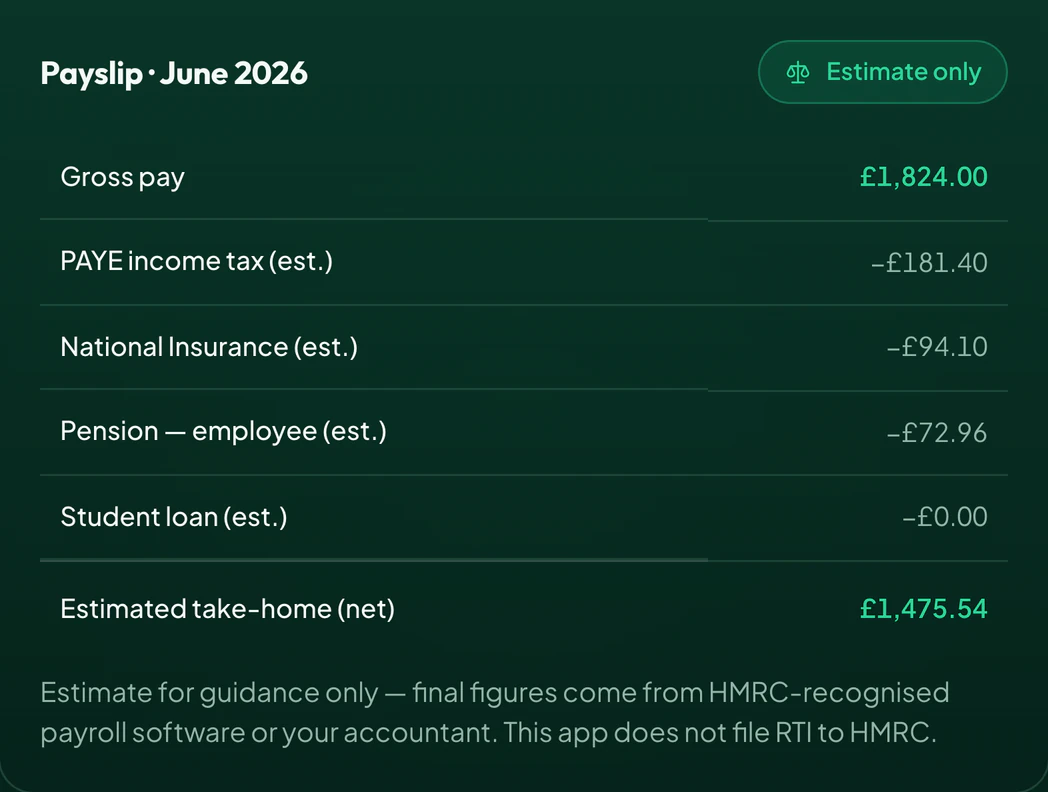
Payslip estimates
Payslip estimate showing gross pay, PAYE, National Insurance, pension and estimated take-home
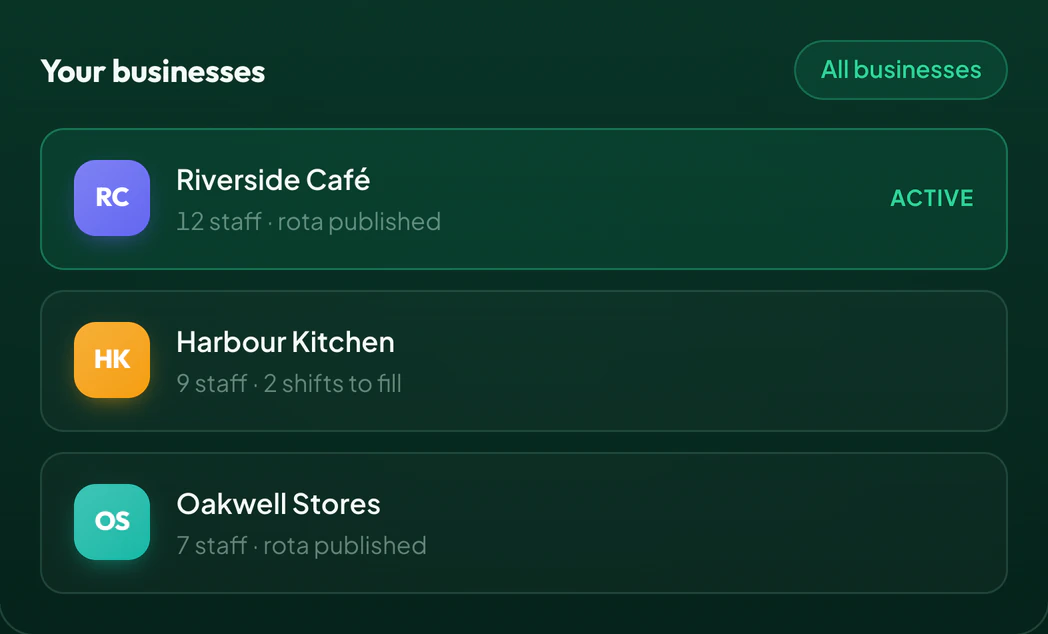
Every business, one login
Multi-business view listing Riverside Café, Harbour Kitchen and Oakwell Stores under one login
Everything it does.
60 features, in 7 groups
StaffRota plans the week, tracks the hours actually worked, manages holidays and sickness and sends pay-ready timesheets to your accountant, from any phone.
Who it is for
- Cafés and restaurants
- Service stations and convenience shops
- Owners running more than one business from one login
- Managers who send timesheets to an accountant
Planning
- Weekly rota builderSet each person's day to Work, Off, Holiday or Sick and watch the hours add up as you go.
- Week, day and month viewsSwitch between a full week grid, a single day and a month overview of hours and gaps.
- Split shiftsAdd up to three work periods in one day, such as a morning and an evening.
- Coverage gap stripA red strip shows any hours nobody is scheduled, so you spot gaps before the week starts.
- Clash and rest warningsAmber warnings flag double-bookings, working while on leave, short rests and over-long weeks without blocking you.
- Opening hoursSet opening times per day or mark a day closed, so closed days never show as false gaps.
- Copy week and templatesCopy last week, copy a single shift, or save a week as a template and reuse it.
- AI weekly draftDraft next week from your usual patterns, then review and approve it yourself; it is never published automatically.
- Smart cover suggestionsGet a ranked list of who is best placed to cover a sick day, holiday or gap.
- Labour cost estimatesSee estimated labour cost per day and week as you schedule, visible to managers only.
- Admin-only shiftsPencil in shifts only you can see; staff just see TBC until you confirm.
- Publish and notifyPublish the rota to tell staff; later edits are flagged so you can notify only those affected.
- Rota commentsLeave comments on a week's rota for managers and staff to see.
- UK bank holidaysBank holidays for England and Wales, Scotland or Northern Ireland are picked up automatically from the official GOV.UK list.
Staff app
- Staff loginsEvery team member gets their own login to see their shifts on their phone.
- Open shiftsPost unfilled shifts and let staff claim them, with you approving who gets each one.
- Shift cover and swapsStaff can offer a shift for cover or propose a swap with a colleague, and nothing changes until you approve.
- Staff availabilityStaff set the days and times they cannot work, and it shows on your rota and steers the AI draft.
- Team announcementsSend one-way messages to the whole team or a few people, with read receipts and an optional 'Got it' button.
- Email and push notificationsNotify staff by email, mobile push or both when the rota changes or something needs attention.
- Installable on phonesAdd it to your home screen from the browser and it opens like a normal app, no app store needed.
- Dark modeSwitch to a darker screen that is easier on the eyes in the evening.
Time & attendance
- Phone clock-inStaff clock in and out of their shifts from their phone, with a location check.
- Tablet PIN kioskPut a tablet in the shop and let staff clock in with a personal PIN.
- Scheduled vs actual hoursCompare what you rostered with what was actually worked, side by side.
- Attendance variance reviewSpot differences between planned and worked hours and check them before payroll.
- Unpaid breaksSwitch on automatic unpaid break deductions for the staff who need them.
Leave & absence
- Leave requestsStaff request leave from their phone and you approve or decline with a tap.
- Rota and payroll syncRecord a holiday or sick day once and it appears on the rota and timesheet automatically.
- Holiday entitlementTrack each person's remaining holiday, with an estimator that suggests a statutory entitlement to check.
- Leave typesRecord holiday, sick and other types of leave, including entries you add yourself.
- Absence historySee every absence spell per person over the last 12 months, the leave year or all time.
- Statutory Sick PayChoose per business whether sick days are paid as SSP, full pay or unpaid, using 2026 rules.
Pay & payroll
- Pay-ready timesheetsScheduled hours roll straight into the current pay period with no double entry.
- Your own pay periodPay weekly (Monday to Sunday) or monthly starting on any day, set separately for each business.
- Hourly, salaried and overtimeHandles hourly and salaried staff and overtime when working out gross pay.
- Bonus, tips and commissionAdd one-off or recurring bonuses, tips and commission to a person's pay.
- Timesheet adjustmentsChange a total when you need to; every adjustment is logged.
- Send to accountantEmail the pay period as PDF and Excel with a leave summary in one click, with every send logged.
- Payroll CSV exportDownload a payroll-ready CSV, including a Sage 50-style layout, to import into your payroll software.
- Estimated deductionsSee a clearly-labelled estimate of PAYE, National Insurance, pension and student loan to sanity-check take-home pay.
- Payslips and Employer's SummaryPrint payslips and an Employer's Summary as PDF or Excel.
- Minimum-wage checkGet a warning if anyone's hourly rate is below the legal minimum for their age band.
- HMRC rate-watchA daily check keeps the tax and wage figures behind the estimates up to date.
Multi-site & admin
- Multiple businessesRun several shops or cafés from one login and switch between them in a tap.
- Per-business payroll setupEach business keeps its own payroll calendar, accountant and employment terms.
- All-businesses dashboardPlan the whole week across every site on one screen.
- Cross-site clash warningsGet flagged if someone is double-booked or on leave at another of your sites.
- Combined weekly hoursSee each person's total hours across all sites for working-time checks.
- ReportsReports on hours, labour cost, overtime, leave and attendance, downloadable as CSV or PDF.
- Share from your phoneSend a rota, report or timesheet to WhatsApp or other apps straight from your phone's share sheet.
- Working Time guidanceAdvisory warnings on weekly rest, 48-hour average weeks, breaks and under-18 limits, for guidance only.
- Admin and staff rolesManagers see everything; staff only see what you choose to show them.
- Four-step setup wizardYour business and payroll dates, your team, your usual shift times, then a checklist of what to do next. Every step can be skipped.
Security & data
- Two-factor sign-inProtect your login with an authenticator app and one-time recovery codes.
- Email verification and resetVerify your email and reset a forgotten password by email.
- Data export and deletionExport all your data or delete your account whenever you want.
- Daily backupsYour data is backed up every day.
- Separate account dataEach customer's data is kept separate from every other account.
- Secure card paymentsPay and manage your plan through Stripe; card details are never stored by the app.

Already using StaffRota?
The fastest answers come from the team behind StaffRota, who know it inside out.